Your seed phrase is on a piece of paper.
Maybe it’s in a safe. Maybe under a floorboard. Maybe split across three locations because someone on Reddit said that’s what “serious” crypto people do. But it’s still paper. Paper burns. Paper floods. Paper gets lost.
What if your backup couldn’t rot, couldn’t degrade, and looked like nothing to anyone who found it?
That’s what NFC Safe does. It encrypts any text - seed phrases, passwords, recovery codes, whatever you need to keep secret - onto an NFC tag with 256-bit AES encryption. The tag is self-contained. No cloud. No server. No account. To read the secret, you need the physical tag and the passphrase. Without both, the tag is just a tiny piece of plastic with some gibberish on it.
The encryption format is fully documented and open, including a reference Python decoder. Your secrets don’t depend on the app existing - if NFC.cool ever disappears, you can still recover your data with a standard NFC reader and the spec.
I built NFC Safe because I wanted my own passphrases stored redundantly on physical tags I could distribute across different locations. If something happens to one location, another tag survives. If someone finds a tag, they can’t read it. It’s the simplest redundant secret storage I could think of.
The Problem with Storing Secrets
Every method of storing a secret has a weakness:
Paper burns, floods, degrades, gets lost
USB drives have connectors that corrode, filesystems that corrupt
Cloud password managers are great until the service goes down, gets breached, or you lose access to your account
Hardware wallets are excellent for crypto but don’t store arbitrary text like recovery codes or passphrases for other services
Your brain forgets, and you can’t easily pass a secret to someone else
The ideal backup would be:
Physically durable - survives water, impact, and decades of neglect
Encrypted - useless to anyone who finds it
Self-contained - no dependency on a service, app, or account
Redundant - cheap enough to put in multiple locations
Long-lasting - no battery to die, no disk to degrade
NFC tags hit all five. They have no battery, no moving parts, and the NTAG216 chip inside them is rated by the manufacturer for 10 years of data retention - though in practice, at normal room temperature, that’s likely much longer. Epoxy-coated variants are water-resistant, handle impact well, and are tough enough to survive being stepped on, dropped, or buried. They won’t survive a house fire - no small plastic object will - but by distributing tags across multiple locations, you don’t need any single tag to be indestructible.
How to Use NFC Safe
NFC Safe lives inside NFC.cool Tools under the NFC Apps section. You choose between Encrypt and Decrypt with a segmented control at the top.
To encrypt a secret onto a tag:
Open NFC.cool Tools and go to NFC Apps > NFC Safe
Make sure the Encrypt tab is selected
Type or paste your secret text
Set a passphrase - use a long, randomly generated one for real security (see Security Considerations below)
Tap Encrypt
Hold an NFC tag to your phone - the app writes the encrypted data to the tag
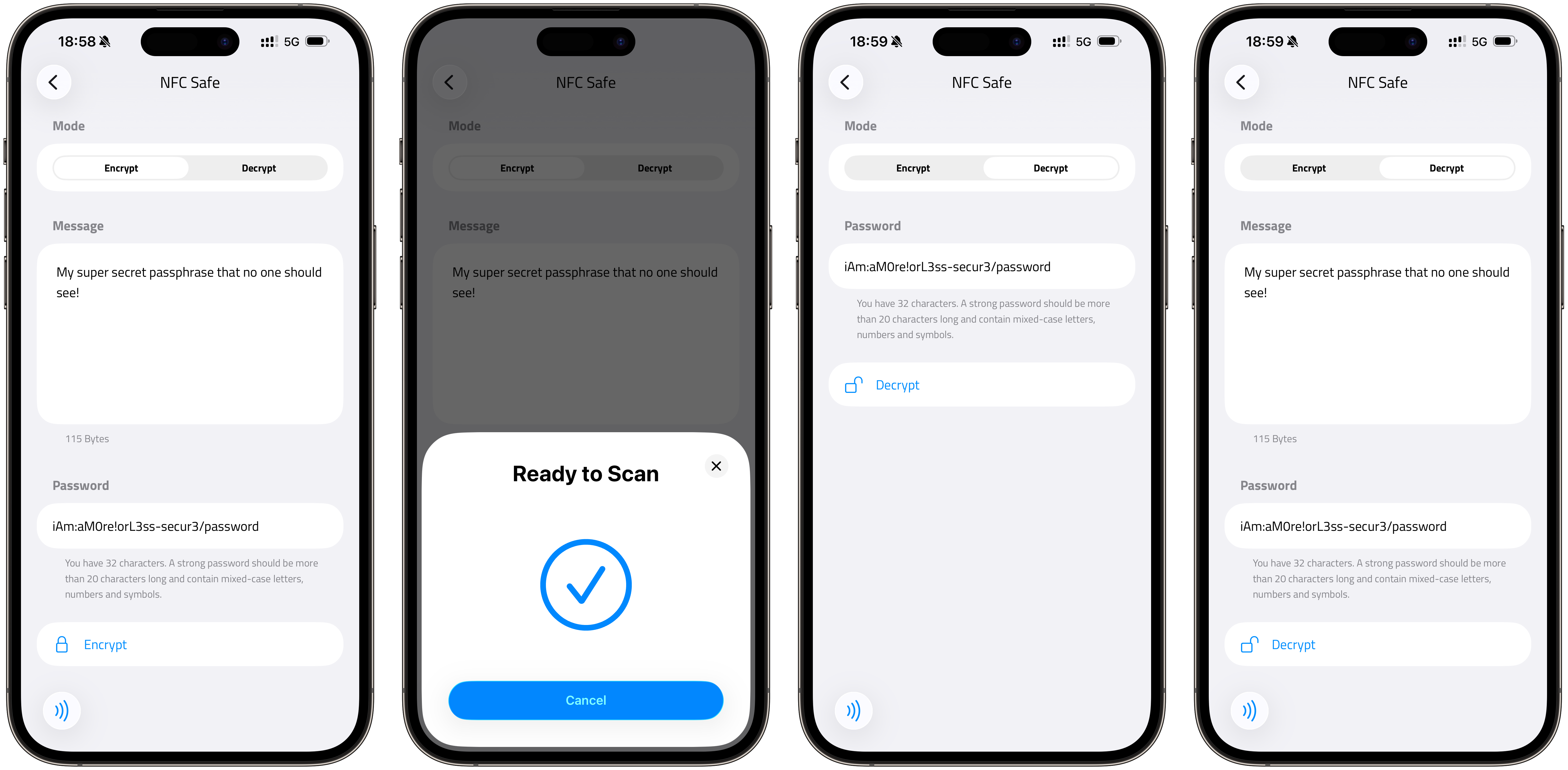
To decrypt a tag and read your secret:
Open NFC.cool Tools and go to NFC Apps > NFC Safe
Switch to the Decrypt tab
Enter your passphrase
Tap Decrypt
Hold the tag to your phone
Your secret is revealed on screen
Under the hood, NFC Safe uses AES-256-GCM encryption with a key derived from your passphrase via PBKDF2 (HMAC-SHA-256, 100,000 iterations, 16-byte random salt). The data is stored on the tag using a custom NDEF record format (urn:nfc:ext:crypto). The format is fully documented and open - if NFC.cool disappears in 15 years, you can still recover your data with a standard NFC reader and a 30-line Python script.
A note on the NDEF type: urn:nfc:ext:crypto does reveal that a tag contains encrypted data. It doesn’t reveal what is encrypted, but it flags the tag as worth attacking to a determined adversary. Your security rests on passphrase strength, not on format obscurity.
The Redundancy Strategy
Here’s where it gets interesting. An NTAG216 tag costs roughly the same as a cup of coffee. You can buy a handful of epoxy-coated ones and encrypt the same secret onto multiple tags, then distribute them:
One in your desk drawer at home
One in your office
One at a family member’s house
One in a safety deposit box
One hidden wherever you hide things
Each tag alone is meaningless without the passphrase. Someone breaks into your office and finds a small plastic disc? They can’t read it. They’d need to know it’s an NFC tag, know to use NFC.cool Tools, and know your passphrase. The physical tag and the passphrase are two separate factors, held in two separate places.
This is the same principle as a hardware wallet’s seed phrase backup, but applied to any secret, and without the $100+ hardware.
Why NFC, Not USB or SD Card
NFC tags have specific advantages for secret storage:
No connector - nothing to corrode, bend, or break. USB drives have physical connectors. SD cards have contacts. NFC tags are a coil and a chip sealed in epoxy.
No battery - passive NFC tags are powered by the reading device’s electromagnetic field. They can’t die in a drawer.
No filesystem - there’s nothing to corrupt. The data is written directly to memory pages on the chip.
No driver - every smartphone can read NFC. No cable, no adapter, no driver install.
Small and cheap - an NTAG216 tag is about the size of a coin and costs under a dollar in quantity. You can put them anywhere.
Durable - epoxy-coated variants resist water, impact, and UV exposure. They’re not indestructible - fire will melt them - but they’re remarkably tough for something the size of a coin.
The main limitation is storage capacity. An NTAG216 holds 888 bytes of user memory. After the encryption overhead and NDEF formatting, you can store roughly 500-700 bytes of plaintext depending on your passphrase length. That’s plenty for a seed phrase (typically 24 words, ~200 bytes), a long password, or a few recovery codes. It’s not enough for a full password database - use a password manager for that, and put the master password on an NFC tag.
What to Store on an NFC Safe Tag
Practical use cases:
Crypto seed phrases - the most obvious one. 12 or 24 words, easily fits on a tag
Password manager master passwords - your 1Password, Bitwarden, or KeePass master key
Two-factor recovery codes - the backup codes Google, Apple, and every other service gives you
Encryption keys - PGP private keys, SSH keys, VeraCrypt passphrases
Emergency contact info - encrypted next-of-kin details, medical information, insurance numbers
Dead man’s switch - a secret you want someone to find only if they know to look for it and have the passphrase you gave them
What You Need
Epoxy-coated NTAG216 tags - the 216 variant (888 bytes) gives you the most storage. Epoxy coating makes them water-resistant and durable. Amazon US | Amazon Europe (affiliate links)
NFC.cool Tools on iPhone (Android coming soon)
A strong, randomly generated passphrase - see Security Considerations below
Security Considerations
A few things worth being honest about:
Your passphrase is everything. 256-bit AES is effectively unbreakable. Your 6-character password is not. The app suggests 20+ characters, but length alone isn’t security - entropy is.
correcthorsebatterystapleis 28 characters but only ~44 bits of entropy. A 20-character randomly generated string (mixed case, digits, symbols) is ~120 bits. NFC Safe uses PBKDF2 with 100,000 iterations to slow down brute-force, but that’s a speed bump, not a wall. Use a randomly generated passphrase for real security.NFC range is short. NFC works at ~4 cm. Nobody is scanning your tags from across the room. But if someone has physical access to the tag and the right app, they can attempt decryption. A strong passphrase makes this irrelevant.
No remote wipe. If a tag is lost, you can’t erase it remotely. This is a feature, not a bug - the tag has no network connection. If you’re worried about a specific tag being compromised, destroy it physically. Scissors work on most tags. Tin snips work on all of them.
Passphrase recovery. There is none. If you forget your passphrase, the data is gone. This is by design - no backdoor means no backdoor for anyone else either. Write your passphrase down somewhere separate from the tags, or use a pattern you’ll remember.
The Bigger Picture
NFC tags are becoming the storage medium for things that matter. The EU Digital Product Passport allows NFC as one of several data carriers, alongside QR codes and RFID. Philips puts them in toothbrush heads to track replacement cycles. Hotels use them for room keys. They’re cheap, durable, and universally readable by the device already in your pocket.
NFC Safe takes that durability and adds encryption. The result is a backup that outlasts paper, can’t be read by anyone who finds it, and costs less than a cup of coffee. No single tag needs to survive everything - that’s what redundancy is for.
No subscriptions, no cloud dependency. And no vendor lock-in either - the encryption format is fully documented with a reference Python decoder. Your secrets don’t depend on our servers, our app, or our company existing.
Sometimes the best technology is the kind that disappears into the background and just works for decades. That’s an NFC tag with your secret on it, buried under a floorboard, waiting until the day you need it.
Ready to put your secrets on something that survives? Download NFC.cool Tools for iPhone and try NFC Safe today. Coming soon to Android.