Your electric toothbrush is spying on you.
Not in a creepy surveillance way. In a “we put a tiny NFC chip in your brush head to nag you into buying replacements” way. Every Philips Sonicare replacement head has an NTAG213 embedded in the plastic that tracks how long you’ve been brushing and tells the handle to flash a warning light when it decides your three months are up.
Welcome to the Internet of Shit.
The thing is, three months is a recommendation, not a medical fact. Bristle wear depends on how hard you brush, what toothpaste you use, and how often. The chip doesn’t measure bristle condition. It just counts seconds. A gentle brusher with soft toothpaste might have perfectly fine bristles at three months. The timer doesn’t know or care.
NFC.cool Tools can now read that chip, show you exactly how much life your brush head has used, and reset the timer if you decide your bristles are still good. Here’s how it works.
What’s Actually on the Chip
Cyrill Künzi tore down the protocol and mbirth mapped every byte. Here’s what the NTAG213 in your brush head stores:
Brush head type and color - a single byte at page
0x1Fthat identifies the model (Premium All-in-One, Gum Care, DiamondClean, etc.) and its color (mbirth’s memory map lists 22 known types)Target lifetime - at
0x21, usually0x5460= 21,600 seconds, which is 180 two-minute brushing sessions, or three months of twice-daily useManufacturing code - at
0x21-0x23, the production date and line as ASCII, like241206 31K(manufactured December 6, 2024, on line 31K). Also printed on the stemAccumulated brush time - the first two bytes at page
0x24store the total seconds the head has been in use as a 16-bit value. When it reaches0xFFFF(65,535 seconds, about 18 hours of continuous brushing), the counter stops. A brand-new head starts at00:00:02:00- the first two bytes are zero (no usage), the meaning of the last two bytes is currently unknownLast intensity and mode - at
0x24as well: Low/Med/High and Clean/White+/Gum Health/Deep Clean+A URL - pointing to
philips.com/nfcbrushheadtap, which opens if you tap the head with a generic NFC reader
When the accumulated time exceeds the target (21,600 seconds), the handle blinks its amber LED. That’s the chip talking, not the bristles.
Why You Might Want to Reset It
The three-month replacement interval is a Philips recommendation, not a scientific measurement of bristle wear. The chip counts seconds, not bristle fraying. If you want to decide for yourself - by looking at your bristles instead of obeying a countdown timer - resetting the counter lets you do that.
You might also reset if you rotate between multiple heads (travel vs. home) and want to track them yourself.
How the Password Works
The NTAG213 is password-protected. Every brush head has a unique 4-byte password. The toothbrush handle authenticates with it every time it writes to the tag.
The password is computed from two inputs: the tag’s 7-byte UID and the manufacturing code stored on the tag (and printed on the stem). Aaron Christophel reverse-engineered the algorithm from the Sonicare firmware after Cyrill Künzi originally sniffed the password transmission using a software-defined radio.
⚠️ Important: The NTAG213 permanently locks after three failed password attempts. The chip becomes read-only forever - not even the toothbrush can write to it anymore. Don’t guess.
How to Check and Reset with NFC.cool Tools
Here’s how it looks in the app:
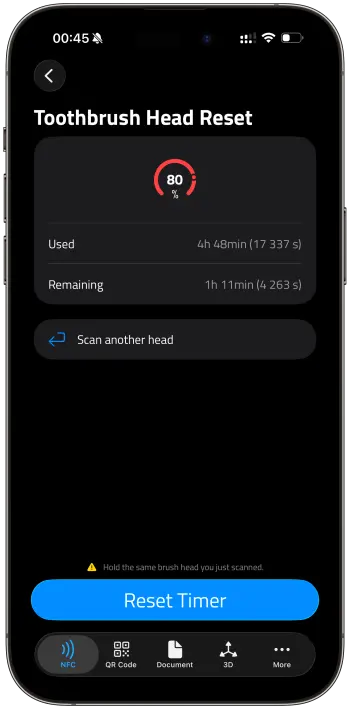
NFC.cool Tools handles the whole process: reading the tag, computing the password, and showing you the stats. No hex commands, no web calculators, no SDR.
Open NFC.cool Tools on your iPhone
Go to Toothbrush Head Reset
Tap Read NFC and hold the brush head against your phone
The app shows a percentage gauge of how much life the head has used, with used and remaining time below
Tap Reset Timer to set the usage counter back to zero, or scan another head
Available now on iPhone, coming to Android in a future update.
What the Reset Actually Does
When you reset, you’re writing 00:00:02:00 to page 0x24 - the same value a brand-new brush head ships with. Only the first two bytes (the usage counter) are changed back to zero. The meaning of the last two bytes is unknown, so the app preserves them.
The toothbrush starts counting from zero again, and the amber light comes back after another three months. At which point you can check your bristles and decide for yourself.
The Bigger Picture: NFC in Everyday Objects
A toothbrush head with an NFC chip that counts down to your next purchase is peak Internet of Shit. We love NFC at NFC.cool, but embedding it in disposable plastic specifically to nudge you toward buying more is… a choice.
The same NTAG213 chip is also used for things that actually serve the consumer: product authentication, access control, and soon the EU Digital Product Passport, which will require NFC tags on consumer products so you can verify what you’re buying and where it came from. That’s NFC being used for you, not against you.
NFC.cool Tools reads and writes all of these. The Sonicare feature is one example of understanding what’s on the tags around you, and deciding what to do with that information.
Further Reading
Cyrill Künzi’s original reverse engineering writeup - SDR sniffing, password extraction, and the first detailed analysis of the Sonicare NFC protocol
Aaron Christophel’s password generator - the algorithm extracted from the Sonicare firmware
mbirth’s NTAG213 memory map - detailed documentation of every byte on the chip
Have a Sonicare brush head to check? Download NFC.cool Tools for iPhone or Android (Sonicare reset coming soon on Android) and see what your toothbrush has been tracking.